3.43.1 |
  
|
3.43.1 |
|
You can now define NTAccount table and a control to select a NT user and assign it to your project.
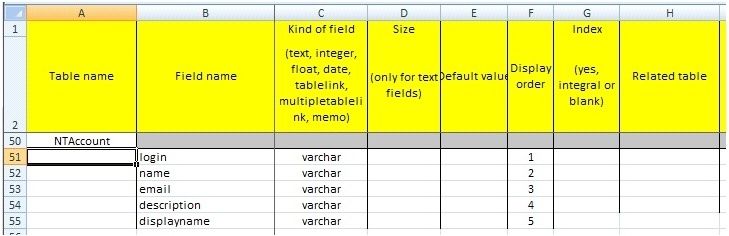
Add new virtual table NTAccount to ‘tables’ sheet and add any of these fields depending on what details you want to see in your NT users window: login, name, email, displayname, description, Kind of field: varchar or text, define your preferred ‘Display order’, ‘Field format’, ‘Field width’, you can ignore other properties.
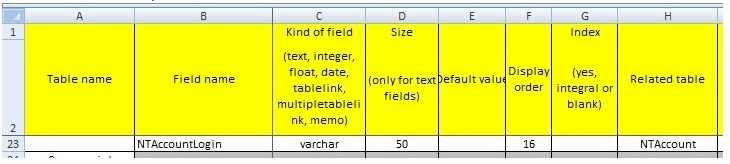
Add new column to your projects table, e.g. NTAccountLogin, varchar, 50 (max login length?), a ‘Display order’ number and write NTAccount as ‘Related table’, ‘Field format’ = @ and some preferred ‘Field width’.
Add new TEXTBOX control, e.g. TEXTBOX_NTACCOUNT, ‘Source table’ = NTAccount, ‘Field in Projects’ = <your column name in projects table, e.g. NTAccountLogin>, ‘Fields Displayed’ – formatted value displayed in control, e.g. @login (@email). You can use all NTAccount names listed above. These @+column_name variables are replaced by actual values of a NT user.

In main projects tables, always only login of NT user