3.44.6 |
  
|
3.44.6 |
|
In addition to color name, also RGB value of color can be used to represent a background/foreground color of PM cells and controls, syntax: RGB red, green, blue
Important is starting RGB text and 3 numbers separated by comma, e.g.:
=IF(M6=0,"Light Gray","RGB 245,73,73")
=IF(M7=0,"Light Gray","rgb100, 50, 20 ")
In addition, so far for displayed standard controls, only BackColor was inherited from the cell, now also ForeColor.
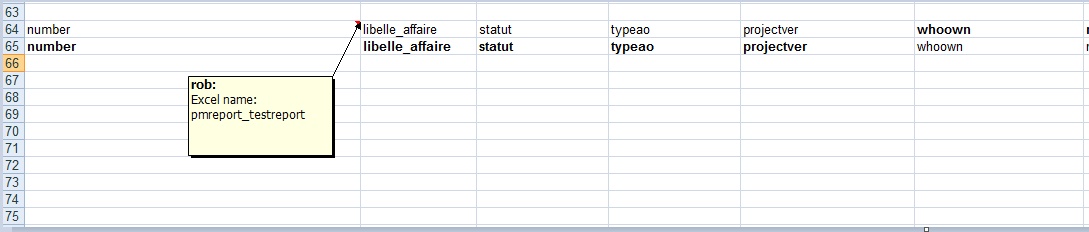
You can define breakdown report with new allversions parameter to include all project versions in report, not only active (last version) projects.
pmreport(breakdown,testreport,allversions)
You can optionally use conditional formatting (like so far for any report) to hightlight active versions.
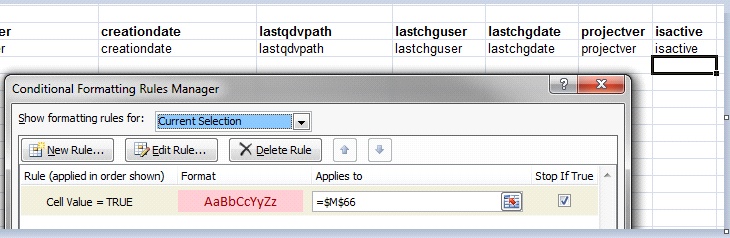
You can now add also built in fields (except projectid) to breakdown and standard reports: "whoown", "number", "creationdate", "lastqdvpath", "lastchguser", "lastchgdate", "projectid", "projectver", "projectver_letter", "isactive" (only breakdown reports), "ltlabel" (Branch). These fields are now displayed also in ‘Reports fields’ dialog accessible from Reports window.
Notes:
Standard reports – project grid data visible in PM limited to fields defined for your standard reports are included in reports. It means that either all (filtered) active projects or when you switch to ‘Project versions’ view, all project versions of one selected project in PM are included in the report
Breakdown reports – are more flexible, were used so far for breakdowns/summaries. They support aggregate functions, custom SQL expression, group by fields. You can add now also built in fields. When you include a unique column, e.g. number, the report can then be used as standard report with all projects (optionally also all project versions) with all details, not only aggregated data
Enhancement: Internal lastqdvpath field (path to linked estimate) is now displayed in project grid (like internal ‘Creation date’, ‘Change date’, …)
Date 1/1/1900 is now interpreted as special date value in project view - date cell is blank and activated Calendar displays Today. No default date for Calendar control is now interpreted as special date value 1/1/1900. It means for Calendar control: no default date in Template = 1/1/1900 default date in Template = blank cell in PM = Today date in displayed Calendar in PROJECT view. In Filter view, 1/1/1900 is displayed in cell and also in Calendar as normal 1/1/1900 date.
In SQL Server you can define computed columns:
A computed column is computed from an expression that can use other columns in the same table. The expression can be a noncomputed column name, constant, function, and any combination of these connected by one or more operators. The expression cannot be a subquery.
For example, in the AdventureWorks2008R2 sample database, the TotalDue column of the Sales.SalesOrderHeader table has the definition: TotalDue AS Subtotal + TaxAmt + Freight.
Unless otherwise specified, computed columns are virtual columns that are not physically stored in the table. Their values are recalculated every time they are referenced in a query.
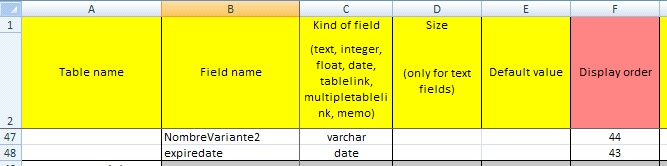
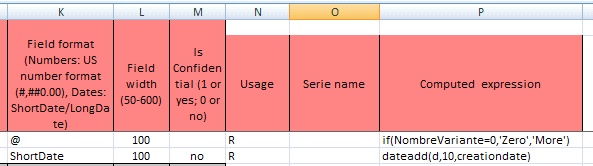
The computed expression is specified in new property 'Computed expression' (column P) in 'tables' sheet. For columns with this expression, they are created by ProMo+ as computed columns . You can then use them as normal columns in project grid, project view, filter view. They are however only readonly in project view. This expression must be exact correct SQL expression, otherwise the SQL script for PM database creation will fail. Currently one translation is supported: if(Cost1 <> 0, Cost1, Cost2) is translated to case when .. then .. else ... end SQL expression.