7.26.1219 |
  
|
7.26.1219 |
|
Released on July 28, 2026
For some big SQLite databases, QDV attempted to optimize them at opening time. This was not possible if the databases were located on read-only folders or if the files were write protected.
A new Sync with Management DB button was added in Automation > Collaboration menu.
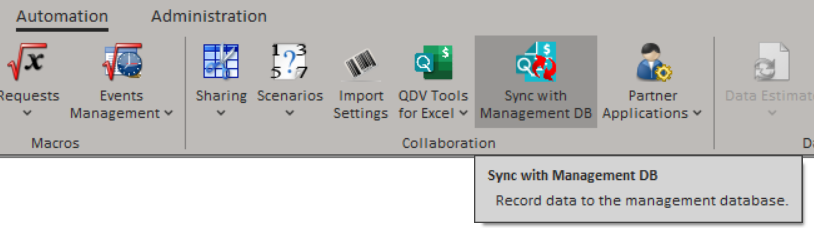
It writes the estimate data to a management database. It is only allowed if the estimate is linked to a project management, the user has permission to push the data to management database, and if the Only button in the menu option is selected in Tools > General > New estimate settings.
Previously, it was only possible to read forced selling prices or incidences from the API. Now you can also write them. Two methods, ITask.SetFieldValue and Itask.SetFieldsValuesToDb, no longer refuse setting the fields that are involved in forced values. To keep consistency with their reading counterparts, they use different fields.
With SetFieldValue:
•To set a forced selling price, call this method with the forced value for "WBS_SellingPriceBeforeCoeffPerUnit" field.
•To set a forced incidence, call this method with the forced value for "WBS_Incidence" field.
•To remove a forced selling price or incidence, call this method with an empty string for the corresponding field.
With SetFieldsValuesToDb:
•To set a forced selling price, call this method with the forced value for "WBS_ForcedSellingPricePerUnit" field and set the corresponding "WBS_ForcedMode" field to 2.
•To set a forced incidence, call this method with the forced value for a virtual "WBS_ForcedCoeff" field and set the corresponding "WBS_ForcedMode" field to 1.
•To remove a forced selling price or incidence, call this method with the "WBS_ForcedMode" field set to 0.