3.43.5 |
  
|
3.43.5 |
|
In new Template v4 empty row and column are added to Projects/Filters/Balance view to first row/column.
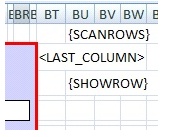
In this first row you can define with “{SCANROWS}” which column should be scanned to identify which rows should be hidden or shown with a formula with “{HIDEROW}” or “{SHOWROW}” result to hide or show that row based on some condition – current value of a control.
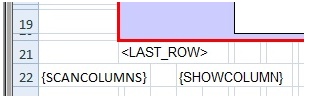
In this first column you can define with “{SCANCOLUMNS}” which row should be scanned to identify which columns should be hidden or shown with a formula with “{HIDECOLUMN}” or “{SHOWCOLUMN}” result to hide or show that column based on some condition – current value of a control.
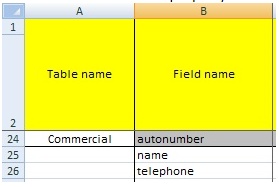
Number of child items (customers, …) is mandatory and must be unique. If you prefer auto numbering when you don’t need to maintain it yourself, you can specify in tables sheet autonumber property in column B for these tables. Your records will have then assigned unique number.
You can now add also these fields to tables sheet for NTAccount virtual table which will be then displayed in NT users window: EmployeeId, Enabled, GivenName, LastLogon, MiddleName, Surname, VoiceTelephoneNumber (in addition to login, name, description, displayname).
These same names (except LastLogon and Enabled) with ‘ntaccount.’ at beginning can be used in ‘Controls’ sheet, ‘Fields Displayed’ property (G column), e.g. ntaccount.name (ntaccount.email, ntaccount.voicetelephonenumber).