7.25.1184 |
  
|
7.25.1184 |
|
Released on July 23, 2025
The propagation to fields synchronized (unique fields defined in the fields manager) was not processed when a line coming from the database of the estimate was edited in the minutes. It was when the line was edited directly in the database of the estimate. Because it’s certainly uncommon to use the synchronization of fields along with the database of estimate (normally not needed), this problem had never been reported.
After several check and repaint operations or after switching QDV to another language, the formatting of the Options header row in Expanded WBS could be damaged. The horizontal alignment was set to Fill. This caused the text to be repeated.

This only happened if the very first column in Expanded WBS was a WBS field from minutes and the minutes field was of type List (Name only).
The problem only occurred if the formula contained [QEval], the value of QEval was 1 and the QUANTITY_FOR_EVALUATION column was not visible in the minutes.
The On_Open_Set event in the databases of sets was triggered each time a set was opened. The problem was that when you open a set using the “eye” button in the minutes, it first open the database with focus on the first set and then, searches for the set being in the focused minute row. That triggered twice the On_Open_Set event.
Now, when you open a database of set with the “Eye” button, only the second event is triggered to ensure you already have data loaded from the minute to the set in the workbook.
This issue was introduced in 7.25.1182.
A new option has been added in the Data sheet of the sets: Enable formulas in input fields.
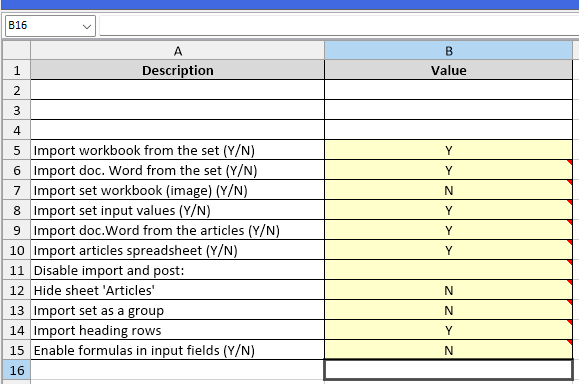
When the value is ‘Y’, at the time you click the ‘Eye’ button in the minutes to load the content of the input fields into a set, the cells containing formulas are preserved (not overwritten by the value stored in the minute).
This can be useful when you use your own process to read input fields (a macro). With this new option, you can keep the logic of your set. When the option is not ‘Y’, the behavior is unchanged: the value overwrites the formula if any.
When the option is ‘Y’ you have no warning at recording time when you have formulas in input cells.