7.25.1183 |
  
|
7.25.1183 |
|
Released on June 29, 2025
When converting a set in the Converter to a SQL Server database and answering Yes to the prompt "Fill list of set articles/sets" (to fill articles from another SQL Server database), the transaction was escalated to a distributed transaction, requiring the Distributed Transaction Coordinator (MSDTC) service.
If MSDTC was disabled, this resulted in the error:
"Network access for Distributed Transaction Manager (MSDTC) disabled."
This was reported to the user as:
"The conversion failed due to an unexpected error: 'Impossible d'inscrire des informations dans l'ouvrage'".
After unifying the transaction handling in Convert function, the conversion no longer triggers a distributed transaction with SQL Server databases.
When the user performed Compute costs (not Compute all) or created a child estimate, an error could occur if the formula for quantity was implemented whether in minutes or in WBS. This issue was introduced in the last beta 7.25.1182.
When the user copied some text into the header or sub-header of a column of type Formula, the existing formula in that column was replaced with the pasted text.
This could happen if an article from the database of the estimate was a part of a set in the database of the estimate. And in the Minutes, the set was referenced on some line and moreover, the set rows were also grouped with F6. If the user has edited, for example, QUANTITY_FACTOR field of this article in Nomenclatures, the value was incorrectly applied to the line with the parent set in Minutes.
The modified formatting of the Options header row in the Expanded WBS was not preserved after the estimate was re-open. It was only preserved if Check and repaint operation was performed before the estimate was closed.
This could happen in overhead sheets of types "MATERIAL", "WORKFORCE", "TIMEFRAMEM", "TIMEFRAMEW", "LIST BOX", if the parent-child structure was defined with the "Organize Structure" menu. The user could select multiple rows with a deeper level and copy them (only columns A and B). If he pasted them in the last empty row in the Core Estimate area, the operation failed and the outline in the sheet was broken. Such pasting is no longer possible.
This happened if a global variable was written from the overhead, and the source overhead cell depended on the WBS overhead sheet. Then for any relevant change in WBS to be reflected in the global variable, the user had to perform Compute all twice.
An error occurred when the user checked the Forced checkbox if the active cell in Expanded WBS belonged to a free WBS field. This is allowed only for WBS_Incidence, WBS_SellingPriceBeforeCoeffPerUnit and WBS_SellingPriceBeforeCoeffTotal columns. Otherwise, an info message is displayed.
This happened if the Formula_For_Quantity field was implemented and the user pressed F2 on Quantity field or on other quantity related field. If that field had “Entry Allowed” is set NO in the fields manager, an error occurred. The F2 solver is only allowed for fields that are allowed for editing now.
When you import articles or sets from external databases, you get the DatabasePath and DatabaseSource fields filled to enable updates of the row from the external database.
You may want to remove these references automatically when you push article or sets to the database of the estimate. This can be useful when you bring change to an item and don’t want to keep it linked to external databases.
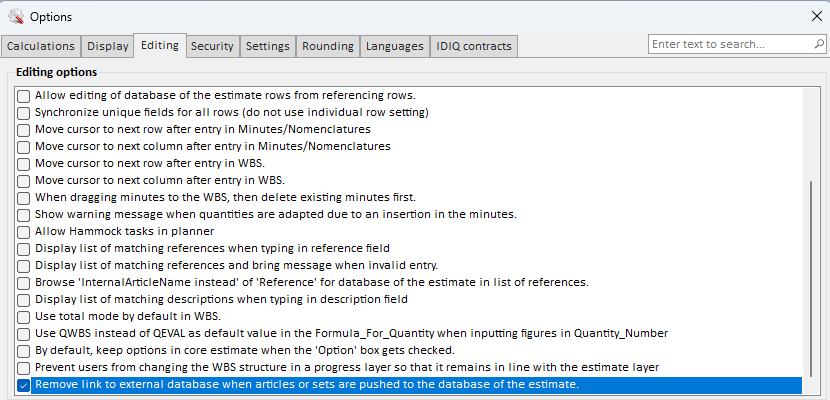
You could of course remove these fields manually but you can not automate this by checking a new check box (Remove link top external database when articles or sets are pushed to the database of the estimate) on the Editing options:
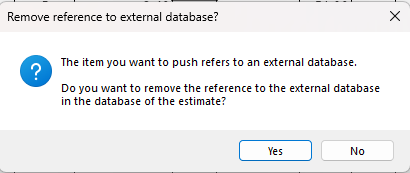
When this option is activated, you’ll get the following message when you move an item to the database of the estimate: