7.25.1188 |
  
|
7.25.1188 |
|
Released on October 8, 2025
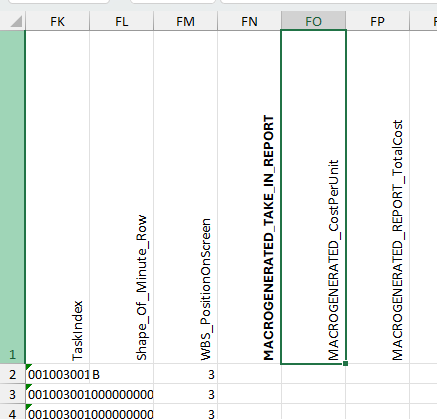
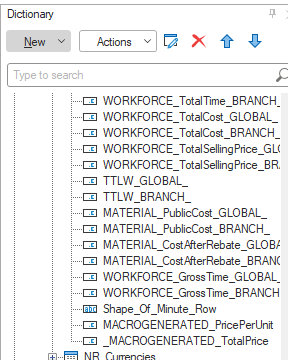
You can now add columns to your report (either Excel or Stimulsoft reports) that are ignored by the reporting engine. This let you spare columns to populate them with macros at the time the report is generated.
Before this change, the engine checked that all columns used in the report existed in the estimate. But now, if the column name in the report starts with MACROGENERATED_ or _MACROGENERATED it will be simply ignored and the report will be created, populating other columns.
So you can use the event On_After_Create_Data_Source to trigger your own macro and populate these columns with your logic.
Under Excel:
Or under Stimulsoft:
Open and Save As funtions in the main module of QDV have been adapted so that they’re more Ms Office-like. This has been extended to support the new QDV 365 (the server side of QDV which contains an Electronic Document Management).
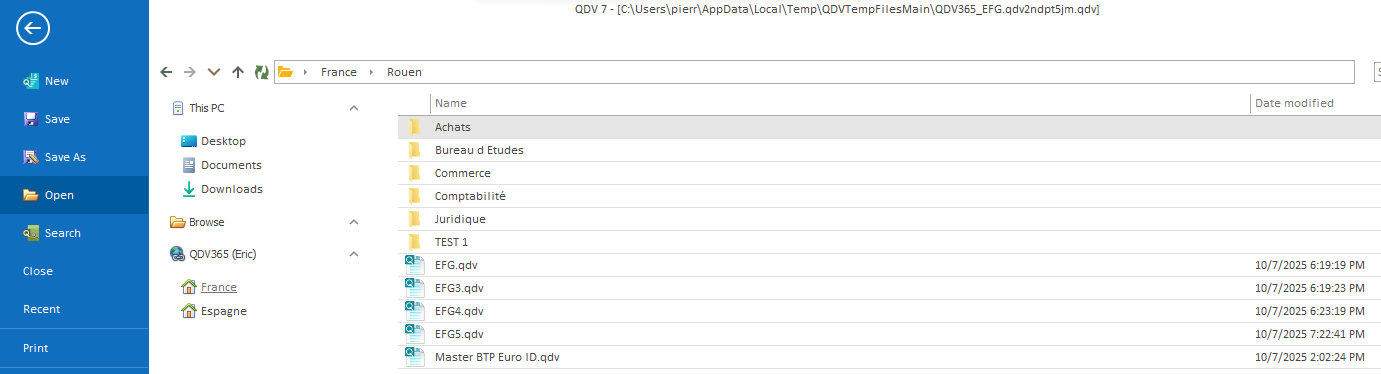
You can always go back to previous interface by simply clicking the “Browse” button.
The problem occurred if there was the "WBS sheet in overhead" feature activated and the expanded WBS was not up to date (refreshed). For example, some WBS fields from minutes pointing to minutes fields of type list could have the old list items values. Then after Compute all, the WBS overhead sheet could still contain the old values, or some values in the overhead could be wrong if they depended on the WBS overhead sheet. Multiple Compute all was required or Check and repaint was needed. The values are correct after the first Compute all now.
When "Import settings" operation was performed and the "Entire Overhead Workbook" option was selected, the following issues occurred.
1.When the source estimate had the "WBS sheet in overhead" feature activated while the target estimate didn’t. The WBS overhead sheet was imported, but the feature was not activated in the target estimate. Attempting to activate it in the options produced an error. The feature is automatically activated now.
2.When the source estimate had not the "WBS sheet in overhead" feature activated while the target estimate did. The WBS overhead sheet was removed, but the feature was still activated in the target estimate. The WBS feature is deactivated now.
Minutes Fields Manager did not display the correct drop-down list for Show in Totals on free fields after clicking Apply button. Now it correctly fills the drop-downs that are specific to the field context.
The problem occurred in the fields manager for database of articles/sets. Wrong drop-down list was displayed in Allowed column for free fields. It displayed more options instead of just Yes and No.
An error occurred when the user imported settings from another estimate and only "Contents of database of estimate" or "Contents of the overhead minute" was selected.
For example, the tree in Overhead minute and Expanded WBS was not refreshed when the file was opened on B.o.Q. main tab.
The error text was "Bad parameters: 1 <= Starting Row <= 9999. NumberofRows should be greater than 0". This issue was introduced in the recent beta version 7.25.1186.
Individual repartition curves applied to specific tasks were lost in "Planner data" overhead sheet after the estimate was upgraded from version 7.23 or older.
An individual distribution curve was deleted if the cell which contained the curve in the Planner data overhead sheet was active, and the user performed Check and repaint operation.
Fix: Wrong handling of "Planner data" sheet by the user API (macros)
The following methods in IWorksheetManager interface produced incorrect results for "Planner data" sheet in overhead:
•GetNativeWorksheet
•GetOverheadSheetInformation
•GetRowPositionsInNativeSheet.
It's no longer possible to set a top-level row in minutes as a compensation row (Automation - Formulas - Target Values), if the row refers to a set or an article in the database of the estimate.
Opening the scenarios manager or applying a scenario could take several minutes if the estimate was large with thousands of tasks. Now these operations take only seconds.