7.25.1199 |
  
|
7.25.1199 |
|
Released on February 19, 2026
The four font buttons (bigger, smaller, ...) were hidden by mistake.
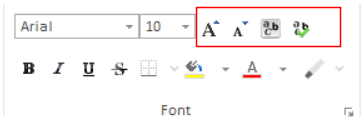
This issue was introduced in the latest QDV 7.25.1197.
If an estimate file was already opened in QDV or used by another process, the user couldn't open a copy of it. Instead of displaying an option to open a copy, QDV just displayed an error. This only happened when the estimate was opened with "Browse" button or selected from the "This PC" file list. It worked correctly if the file was selected from "Recent" page.
There were wrong displayed values when global variables starting with a dot were written from the WBS overhead sheet and called in formula for quantity field. Compute all fixed it only if performed from Overhead view. Now the values are correct after Compute all from anywhere.